毎日 通常購入しなくては使用できないソフトウエアを無料で提供します!
Giveaway of the day — Drive Copy 10 Personal Special Edition (English Version)
Drive Copy 10 Personal Special Edition (English Version)< のgiveaway は 2010年9月16日
Drive Copy 10 PersonalはPCのバーチュアルコピーを作成。稼動システム、ドライバー、、設定のすべてをコピー。USBへ保存して持ち運び可能。<--more-->
Paragon Drive Copy 10 Personaはバグを修正した最新版。
機能:
- Windows 7 サポート(32/64-bit)。Windows 7稼動下のすべてをサポート。
- コピー。完全なハードディスク、パティションをコピー、コピー中のパティションサイズ変更も可能。
- コピー予定設定。コピー期間を予め設定。
- 改善されたユーザーインターフェース。2つのレベルの改善されたインターフェースを提供。
- 大型ベーチュアルマシンをサポート。MS Virtual PC, VMware Workstation, VMware 。
- さらに Linux ExtFS, Apple HFS+もサポート。
- 大幅な合併オプション。他のハードドライブと合併したり異なったハードドライブへの合併も可能。バーチュアルマシンの合併、 Apple ハードドライブも合併可能。
- P2V コピー。Win2K+実際のシステムをバーチュアル環境へ。
- P2P調節OS。他者のツールへの合併が失敗の際にもOS 稼動。
- 簡単なバックアップと回復ウイザード。新しいどらーバー追加が簡単。
3ステップでコピーを可能:
1. PCのバーチュアルコピー作成。 稼動システム、ドライバー、設定などすべてをコピー。
2. バーチュアル環境フォーマット選択。VMWAREまたはMS Virtual PCの好きな環境選択。バーチュアルプレーヤーのダウンロード可能。
3.バーチュアルコピーをUSB へコピー。 同じディスクまたはPCにバーチュアルプレーヤーを保管。
PCが持ち運び可能。Drive Copy 10 Personal Special Editionでハードドライブ一体化が可能。バックアップイメージ作成、パティション作成が簡単。
製品詳細はこちらへParagon Drive Copy 10 Personal Edition website
Limitations: No WinPE included in this download
テクニカルサポート: Giveaway 期間中はテクニカルサポートを提供http://twitter.com/paragonsoftware。寄せられた質問にサポートが対応。
x64 OSユーザーはこのリンクへ (file size: 101 MB)
必要なシステム:
Windows XP Home Edition, XP Professional SP1/SP2 (x32/x64), 2000 Professional SP4, Vista (x32/x64), 7 (x32/x64); CPU Intel Pentium or compatible/ 300MHz or higher processor; RAM 128 MB; Disk space 40 MB; Limitations: No WinPE included in this download
出版社:
Paragon Softwareホームページ:
http://www.paragon-software.com/home/dc-personal/index.htmlファイルサイズ:
101 MB
価格:
$29.95
他の製品
The safest tool for hard drive partitioning! Partitioning is not for amateurs. That is why millions of people have trusted our safe, stable technology and professional software solutions for over 15 years. Our latest Free 11 Edition easily organizes your hard drive and redistributes free space to enhance system performance.
NEW 2010 Advanced Edition - Total PC Protection for Serious Users! Take complete control of your PC’s safety. Based on solid commercial backup and recovery software from Paragon, the new Backup & Recovery 2010 Free Advanced Edition will give you a rich set of features that you can trust. Smart people backup; Backup & Recovery is smart backup.
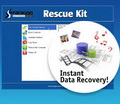
Don't wait for a disaster to strike - get an instant data and system recovery kit today to ensure your protection! Rescue Kit professionally fixes boot problems as well as retrieves your data when your system fails to boot. It even rescues deleted partitions. All, you need to do to achieve complete control over any situation is burn the software on your CD/DVD!
iPhone 本日のオファー »



Android 本日のオファー »



コメント Drive Copy 10 Personal Special Edition (English Version)
Please add a comment explaining the reason behind your vote.
I think MANY GAOTDers will want to know the difference between
Paragon Drive Copy 10 PERSONAL SPECIAL EDITION
and Paragon Drive Copy 9.5 PERSONAL EDITION
since we have the latter and are presently being offered the former....Usually the site gives comparisons between different apps and different version numbers, but not between regular and Special editions....
The issue of not wanting to uninstall our present version of a Paragon app in case the new one doesn't install is a constantly reoccurring question....I have always had trouble with installing over an already-installed Paragon app but have also lost a good P program as a result of having gotten rid ao the ols one and then being unable to install the new one....:-(....
Save | Cancel
HINT for users with other mother tongue:
the registered DLLs (which differ from those of the trial-versions) are just these two files:
a) hdm.dll
b) backuplib.dll
e.g., using GERMAN language:
- Download the german trial version from Paragon
- install it
- download the GODT-version
- extract as usual
- from the now created(extracted) file .msi extract the both mentioned dll´s (u can use the tool "UniExtract"!)
- copy the two dll´s into the program´s folder (overwrite the versions of the trial package)
thats all!
Save | Cancel
I spoke too soon..
Downloaded and tried to install, but Program required reboot before pop up Registration Window appeared.. Entered the product Code etc and it then commenced to install. Shortly thereafter my System Crashed..Big Time.. Windows 7 "Startup Repair" failed and then also the "System Restore" .. Tried an earlier Restore point and it only just recovered..
Rather disappointing..
Save | Cancel
It's recommended to uninstall previous version of the program prior to installing new download. Other products (like Partition Manager) may stay in the system.
This new 10 Specila Edition version has new P2V tools which were not present in version 9.5.
To Al:
Here is further proof….Installation file name: DC10_Pers_x32.msi — 32 bit install
If you read through product description carefully, you will see a separate link to 64-bit version of Drive Copy: http://files.giveawayoftheday.com/ParagonDC10_x64.zip
Save | Cancel
As always, people JUST DON'T READ!!!! Hi you guys that are complaining about the x64 version and so on. The last thing after the product description by the supplier is : "If you are x64 OS user please follow the link here (file size: 101 MB)".
Common guys, you should know better!!!
Save | Cancel