毎日 通常購入しなくては使用できないソフトウエアを無料で提供します!
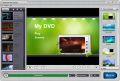
Giveaway of the day — Daniusoft DVD Creator 1.5.0
Daniusoft DVD Creator 1.5.0< のgiveaway は 2011年1月6日
大切なビデオをDVDへコピーして保存。 Daniusoft DVD Creator は迅速にビデオや写真をDVDへコピーしてプレーバック。ISO ファイルやDVDフォルダーへ保存、HDビデオや AVCHD ビデオ (MTS/M2TS), TS, TRP, HD MOVもサポート。
カスタマイズ化したDVDメニューも作成でき、無料のテンプレートや写真、音楽を追加してビデオをフォルム形式で表示可能。
Daniusoft DVD Creatorでカスタマイズ化DVDを作成:
- AVI, WMV, MP4, MOV, MPEG, VOB, FLVなどをDVDへコピー;
- 写真をスライドショーとしてDVDへコピー;
- HD, MTS, M2TS, TS, TRP, H.264などをサポート
- ビデオを ISO ファイルやDVDフォルダーとしてバックアップ;
- DVDをパーソナル化;
- バックグランド音楽を追加;
- DVDを小節分けしてタイトルをつけフォルム形式でプレーバック;
- 簡単な使用方法
注意:
ソフトウエア稼動にはこちらでの登録が必要 ここで (フルバージョン無料)で登録してコードを獲得。
必要なシステム:
Windows XP, Vista, and Windows 7
出版社:
Daniusoftホームページ:
http://www.daniusoft.com/dvd-creator.htmlファイルサイズ:
36.4 MB
価格:
$19.95
他の製品
Daniusoft Video Converter UltimateはビデオをDVDへコピー、DRMを削除、 YouTube ビデオをダウンロードしてiPod, iPhone 4, iPadなどへトランスファー。
Daniusoft DVD Ripper は DVDを MP4, AVI, WMV, MPEG, FLV, 3GP, MP3, M4A, AC3, WMAなどへコピー、iPod, iPhone 4, iPad、PSPなどでプレーバック可能に。
Daniusoft DRM Converter はDRMを iTunes M4V/M4P, BBC iPlayer WMV/MP4などから咲く上、HDビデオなどを変換可能に。
Daniusoft iTransfeは iPod/iPhone/iPadユーザーに必須のプログラムで映画、音楽、写真をiPhone/iPad, PC、iTunes間で管理、ビデオやオーディオを iPod/iPhone/iPad用へ変換。
GIVEAWAY download basket




コメント Daniusoft DVD Creator 1.5.0
Please add a comment explaining the reason behind your vote.

The Good
* Straightforward and easy to use.
* Can author DVDs from SD and HD videos and create slideshows from images (which are also put onto a DVD).
* Supports many input video formats and the four major image formats.
* Allows users to customize image slideshows, including but not limited to allowing users to change the duration of images, add transition effects, flip images (horizontally/vertically), and add text to images.
* Allows users to burn videos/slideshows directly to disk, create ISO, create DVD folder, or all three.
* Has the ability to automatically create chapters.
* Allows users to preview what the DVD will look like after it has been created.
* Supports DVD-5 and DVD-9.
* Users can select from a handful of DVD menu templates, and can download some more.
* Allows users to automatically shutdown computer after processing has finished.
* Supports drag + drop for importing files.
The Bad
* Does not properly scale/resize videos.
* No features to customize audio tracks or add subtitles to videos.
Free Alternatives
DVD Flick
For final verdict, recommendations, and full review please click here.

Want to easily stick a video file you got on-line (or wherever) on a video DVD? If you don't care about anything else -- just want it easy -- then Danuisoft DVD Creator may be just what you're after. It is not serious DVD authoring software, & video DVDs themselves aren't always the easiest nor the cheapest solution to watch your video on TV, so with that in mind, it *might* be worth the $20 price tag to you, & if you can or want to use it, DVD Creator is well worth the GOTD price, i.e. free. The easiest way to watch on-line video on your TV is with a connected TV or Blu-Ray player, though be aware that the on-line connection can also be used to update firmware incorporating new DRM. About as easy & usually cheaper too, run a cable or 3 from a PC [yours or an old one lying around, made from old parts etc.]. 3rd is the option of buying a media player box, like those from Western Digital that are always on sale lately -- I put them 3rd because you might wind up running your video through a converter 1st if it's not in a format the player accepts.
Assuming you're still interested in creating video DVDs & using Daniusoft DVD Creator to do that... it's main failings are: 1) it re-encodes video, regardless if it's in DVD spec or not, 2) it will not accept separate audio files, or more than 1 audio track, 3) you're given no options to create other menu pages & few options re: buttons, 4) output doesn't strictly follow specs [I could add a #5, no subtitles, but with lower end retail software, handling subs isn't that common]. On the positive, it uses a good encoder, the elements that'll be composited on your menu are movable, menus use animation for placing menu elements on screen, there are several templates [with more available if you click the icon next to "Menu Template"], and it's really very easy to use -- once you figure out that some of the buttons across the bottom only work with certain things selected. To add some perspective to it, if you picked up something like the Roxio, Nero, or Sony apps (that author DVDs) over the holiday on sale, there's no comparison -- OTOH compared to paying full MSRP for any of those apps, Danuisoft DVD Creator would be a viable, lower cost option, very roughly in-line with some of the lower end apps from companies like Cyberlink. As far as free-ware apps go, you pretty much have various front ends for dvdauthor [ http://goo.gl/HDEN1 ], like DVDStyler [also available as a portable option at portableapps.com] [doesn't have many authoring options], or the DVD Flick Ashraf mentions [I don't like that it uses VB, nor the recorded 3.5k new registry entries].
Installing Daniusoft DVD Creator in XP means installing "IMAPI_XP_SRV2003_x86.exe" [ http://goo.gl/hTOTP ]. The program's folder holds 180 files, 12 folders, taking up ~64 MB. My Documents picks up a Daniusoft DVD Creator folder holding 127 files, 21 folders taking up ~14.5 MB -- your templates. Added to the registry are 4 file-type associations, an uninstall key, & the registration key -- the MS IMAPI... hotfix OTOH adds well over a thousand. Daniusoft DVD Creator uses the Starburn burning engine & MainConcept encoder. After install you're presented with the registration dialog with the button to request a key from the developer, which is e-mailed to you -- if you don't want to wait, close the dialog & the app opens so you can look around while the e-mail works its way to your in-box.
* * *
When an app like Daniusoft DVD Creator it's difficult to comment on many of the alternatives proposed, for me anyway because so much depends on what you're after. It's also a bit harder to compare DVD authoring apps in a meaningful way if the person reading the comparison hasn't gone through a bit of a learning curve beforehand. Without knowing what's possible with both features & quality, & without knowing the amount of work involved in adding features & boosting quality, it's hard to know just what you should look for in a DVD authoring app. And if you're not sure what you want or should look for, it's hard to recommend or compare apps in a meaningful way. That said...
It's difficult for developers to come up with a good GUI that translates the tech bits & pieces of DVDs into something visually intuitive, especially since the spec NDA prevents them from having good instructions on how to do anything [like creating button images & highlights elsewhere & importing them]. A video DVD authoring app's *job* is *assembling* all those bits & pieces into a DVD -- not editing audio/video streams, & not doing graphics. Nor should you think of or expect a DVD authoring app to be a good transcoder, encoder, or video converter -- you can do better elsewhere. Now including value-added features certainly isn't a bad thing, but it doesn't make sense to compare DVD authoring apps just on those non-core capabilities, while ignoring how well it does its main job, assembling all your work into a video DVD.
If you're interested in creating video DVDs you have 3 buying choices -- you can buy *very* expensive software that comes with a steep learning curve but does most everything [e.g. Scenarist]; you can buy expensive mid-range software that won't do everything, & learn how to ignore many *features* to produce high quality work; or you can buy lower end software, using what you're given to produce basic [often lower quality] DVDs. The freeware end of things is dominated by dvdauthor, & the various Windows front ends for using it -- that & the free version of Muxman if/when you don't care about menus. A 4th choice is to get a Mac, where there is some nice DVD software available. BTW, if you're going to buy something make sure it does Blu-Ray too -- even if you don't do Blu-Ray today, someday you probably will, & why guarantee that you'll have to learn another app? For the last several years sales like those in December have not been uncommon, & if you're patient & don't mind MIR, you can get a nice $100 app that does DVDs for between $0 & $50 -- it might not compare to $600 software, but you wouldn't expect it to.
* * *
*Hopefully* useful Background info...
DVDs are in a word complicated -- it's an old standard designed for the chips available for players in the 90s. They work by or from scripts that have a complicated set of rules, & much relies on hexadecimal values. Everything is spelled out in *very* expensive official docs, & if they'll sell to you it comes with a strict NDA -- most of the info freely available came from reverse engineering, & besides sometimes being wrong, it's spread across the web. Besides the official DVD standards there are common-practice player standards -- most players will not work with every possible feature -- & there are tricks that use parts of the spec in ways the original authors never thought of, creating both new features and, for better or worse new kinds of DRM. Some info on Hexadecimal registers: http://goo.gl/ReYei -- some info on sourceforge: http://goo.gl/tqAKk -- a source of good, reverse engineered spec info if you don't mind the author trying to sell you a more complete version: http://goo.gl/qUzXh.
It's long been common for developers to come up with a single DVD script (or set) they use as boilerplate in their apps -- every DVD layout they produce uses the same scripting. This limits the features available to use on the DVDs you create. It's harder to justify learning the more technical ins & outs of DVDs when they might be approaching obsolescence, but if you're so inclined start with PGCEdit -- together with reading everything you can find on DVD scripts [mostly examples], you'll likely be able to expand on whatever your authoring app allows.
At a simpler level, everything you *see* on a DVD is mpg2 video. The menu pages you create have any text or images or buttons or sprites composited [overlaid] on the background image or video, & it's all encoded to mpg2. Because of that, designing & creating menus should ideally be done in a video editor. DVD buttons are actually just rectangular coordinates, not much different in concept than image maps on a web page. Menu button highlights [what you see that shows you what button's selected] are shapes that the DVD player will color -- any *shapes* within a button's rectangular coordinates are colored when it's selected, activated, or not selected [each state has a different set of colors] [each highlight shape can actually be 4 shapes, one for the basic highlight, one for outline, one for blend, & the rectangular background that's normally transparent, each with its own color/transparency]. It's common for many lower to mid-range DVD authoring apps to let you place an empty button, but not necessarily import your own highlights -- you can still create pro-level menus in your video editor, then use the empty buttons & highlights built into your authoring app, usually using the underline highlight option [simple underline highlights are quite common on retail DVDs].
Also note that if you want to add subs or audio tracks & your DVD authoring software won't allow it, you can always render your DVD layout to your hard drive, then edit it. Using all free tools, PGCDemux will strip out a copy of your DVD audio, &/or video, &/or subs, &/or chapter times, if you need any of those, & usually in 3-5 minutes. There are several tools to turn text-based subs [e.g. .srt] into DVD graphical streams. The free version of Muxman will assemble a DVD layout without menus using your video, multiple audio tracks, & multiple sub tracks, usually in ~10 minutes. VOBBlanker will replace the VOB files (with your title(s) inside) in your original DVD with those you created in Muxman, usually in about 5 minutes. If you added subs in Muxman, IFOEdit or PGCEdit are just a couple of the apps available that can set subtitle colors. PGCEdit can also add scripts, menus, & other features, though that stuff gets advanced with a steeper learning curve. Use Imgburn with or without PGCEdit to set the layer break & burn dual layer DVDs. Long story short, if you're happy with your DVD authoring app, but want subs or added audio tracks etc., if you're willing to spend less than an hour [maybe just 10-15 minutes] you can probably add them to the DVD your software produced.
Very nice looking software.
Installed without a hitch, following directions. It's always nice when you fill out a form with your e-mail and actually receive the e-mail immediately.
Fast loading, doesn't seem to hog CPU. I can't speak for all of the features though - I haven't completed my first conversion.
It's pretty, kind of like a Nero or Roxio program. It's drag and drop based, and I think that's fine.
Although I definitely wouldn't be able to use this every time, as I'm very used to the performance and incredible customization available using ConvertXtoDVD. Nothing...I mean nothing, beats ConvertXtoDVD.
Nevertheless, it looks like a nice program and a little simpler to use. So I rate it well, from what I've seen.
Sorry for two comments - but I found many more customizations that I like.
On the preview of the main menu you can click on a frame and edit the text as well as the location of the frame. It autoadjusts nicely when you type in something larger than the default size of the text box.
Also, on the bottom left under that preview you can click the customize button. There are many features there, including putting a custom background image on the menu, and a lot of the other features ConvertXtoDVD offers.
Also, upon clicking "Burn" it gives you a few more options.
Very nice program, really worth the download.
It looks pretty good and easy to use. I tried it out and discovered that the free film I had been supplied with (legit I hasten to add!) in mp4 format had DRM and could not be converted and burned. However, I was directed to the offical site where they offer a heavily discounted later version under a different name for £16.22 to GAOTD downloaders only.
I downloaded the trial version and discovered it would convert and burn. It was as easy as pie too, but it only allows 3 minutes of the film so that you can see it works. This was good enough for me as the result looked great so I bit the bullet and bought the full version. I am a happy bunny. But if you want to remove DRM you cannot do it with the free version.
iPhone 本日のオファー »





Android 本日のオファー »




http://nl.giveawayoftheday.com/"]http://nl.giveawayoftheday.com/
Save | Cancel