日本語
毎日 通常購入しなくては使用できないソフトウエアを無料で提供します!
$29.95
期限切れ
Giveaway of the day — Smart Audio Editor
Smart Audio Editor is a full-featured digital audio editing software that offers a variety of audio recording, mixing, editing, analyzing and effects processing possibilities.
$29.95
期限切れ
ユーザーの評価:
459
コメントを残す
Smart Audio Editor< のgiveaway は 2009年6月17日

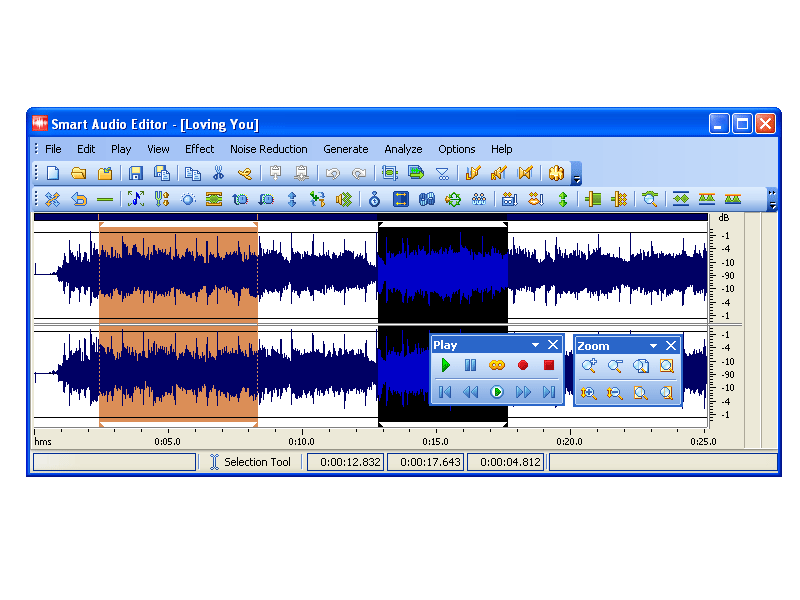
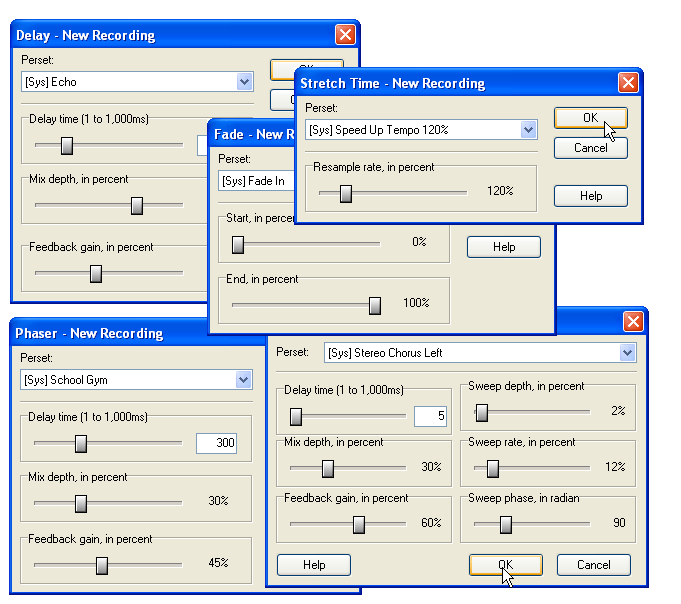
Smart Audio Editor はデジタルオーディオ編集プログラムで、オーディオを録音、編集、分析、処理効果追加などが可能。 MP3, WMA, WAV, Ogg Vorbisなどをサポート。websites, PowerPoint, Flash アニメーションなどのオーディオも編集可能。
必要なシステム:
Pentium: 166 MHz; 64 MB RAM Minimum; Windows 98/Me/NT/2000/XP/2003; MME-compatible Soundcard; Graphics: 256 colors, 800 x 600
出版社:
SmartAudio Systemsホームページ:
http://www.smartaudioeditor.com/ファイルサイズ:
7.49 MB
価格:
$29.95
GIVEAWAY download basket

Make movies out of your videos, audio, and image files.

Play and record audio files, watch videos , and view images.

Listen to any of the 10 million tracks of various genres.

Developed by MPCSTAR
iPhone 本日のオファー »
iPad、iPhone、iPod Touch用の市場で最高の計算機。
特徴:
√人間工学に基づいたボタン
√大きな"プラス"
√削除機能
√美しい音のボタン
√使用履歴
Calculator Easy HD URL scheme is...
$0.99 ➞ 本日 無料提供

$2.99 ➞ 本日 無料提供
Please feel free to give a ★★★★★ rating!
The most powerful unit converter in the market.
$0.99 ➞ 本日 無料提供

$1.99 ➞ 本日 無料提供
$1.99 ➞ 本日 無料提供
Android 本日のオファー »

Whether you're a fan of io games, survival games, or just looking for a fun new game to play, this one is for you!
$0.99 ➞ 本日 無料提供

A collection of icons based on the well-known candy bar.
$0.99 ➞ 本日 無料提供

$5.99 ➞ 本日 無料提供

$0.99 ➞ 本日 無料提供

A nice-looking and beautiful battery charging animation app.
$1.49 ➞ 本日 無料提供
コメント Smart Audio Editor
Please add a comment explaining the reason behind your vote.
[installed quickly and easily on Windows Vista Home Premium x64]
Quite a useful program. has a lot of great features, for example 'noise reduction' and 'reverse'.
The interesting thing about this program is that it is exactly the same as a program called "Free Audio Editor"
http://www.free-audio-editor.com/
the only difference I have found is quite obvious; the GUI has completely reworked to fit the 'new' Microsoft Office look and feel. That and the price is apparently $29.95.
In my opinion, "Free Audio Editor" is slightly easier to use, better looking, and has a learning curve of zero.
so for those of you that may miss this giveaway, you can pick up its twin at http://www.free-audio-editor.com/
Save | Cancel
#6 and others who say Audacity is better should look closer at this program. I only looked it over for a few minutes and found things that Audacity doesn't have one of which being the number of output formats, another being able to play in loop, and another being able to change from Waveform to Spectral mode. These are but a few of the differences.
I have just about every form of music tools from Audacity to Cakewalk and I'm sure this program would be a great add on to compliment the others. No one program has it all, so to say one is better over another is ridicules. Another nice thing about this freebie is if you have to re-format you can still re-install it. DID YOU GET THAT? You can still re-install it according to the install directions, just save the program installer and read me file.
For the basic home user this program is rated five stars by Tucows,and a couple of editors choice awards for non-professional use. http://www.smartaudioeditor.com/reviews.htm Let's face it, if you're a pro you're going to shell out some big bucks for higher end programs so to bicker over free to $100 programs is useless.
Save | Cancel
This is a nice piece of software. It's pretty much Audacity but with a cleaner user interface and a few interesting additions (frequency analyzer, etc).
Save | Cancel
I've been checking the GOTD site daily for over a year, & they've had more than a few audio apps -- Smart Audio Editor is by far the best one I've seen them offer. Don't get me wrong -- if you spent $800 on Cakewalk you're not going to even think about downloading today's GOTD -- but for most audio editing this easy to use program should fill the bill nicely.
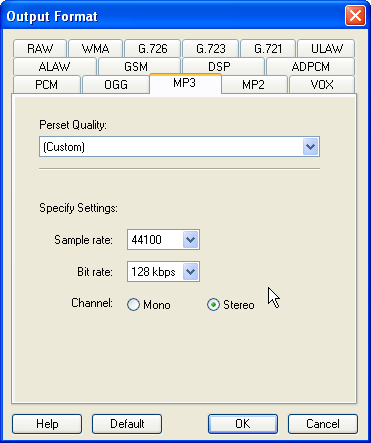
What makes Smart Audio Editor different is that while it uses NCT code libraries like some other apps, you have much better control over the filters & FX, making them very usable, yet not so complicated that you have to take classes to learn how to use them. You have the usual output choices [settings under Options -> Output Format]. The Noise Reduction isn't the same thing found in usually higher end apps, where a snapshot's taken of silence & then subtracted from the audio, but that's something you can easily get into trouble using too much anyway.
The program itself is small, with 76 files [mostly multi-lingual presets] in 2 folders taking up ~ 6 MB. I mentioned the NCT libraries, & there are 13 of these files destined for Windows' System32 folder. When it comes to Windows' Registry, there are quite a few entries but almost every one of those is under the program name: HKCU\Software\SmarAE7.7.1, so it shouldn't cause any problems.
Alternatives... Please bear in mind that while audio software can be quite specialized, there's a lot of feature overlap -- a multi track program might be designed to let you mix several tracks, but still let you use most filters and do quite a lot of editing.
If you want to do original music recording &/or creation, you'll probably want to use plugins for FX that dramatically alter the sound. VST plugins allow you to do that & more, & there's quite a few free ones available [search "vst" & you'll find vst plugin databases on-line]. You'll also want software that uses VST plugins like the free Wavosaur.
If you want to get original, but not *that* original, head over to acidplanet.com. Acid is music creation software that uses loops, comes in 3 versions -- free, home, & pro (that really is pro) -- and allows editing. Acid Planet has free loops to get you started, & an active community.
Some have asked about combining files... Usually you don't -- you mix tracks, where each track has a different file on it. In a nutshell multi-track audio software is a version of those huge mixing boards you see in pictures of recording studios, & yes you can normally add filters & do some editing. From videohelp.com: "Traverso DAW is a GPL licensed, cross platform multi-track audio recording and editing suite..."
Finally, while some of the big name audio software still can cost thousands of dollars, more & more companies are starting to release scaled down packages, including for the home enthusiast. On sale, & with rebates & such you can find these intro level -- but still very capable -- apps from $0 - ~$75.
Save | Cancel
Downloaded fine on Vista HP 32-bit OS, and it appears to be compatible with the Vista OS environment, although this is not one of the listed supported systems in the GiveAway specifications.
Received Microsoft Register error message during install process, but the installation completed anyway despite this bump in the road.
Registration also proceeded smoothly, after which I exited and then re-accessed the program easily, with no problems.
Program has a pleasant, easy-to-read and understand user interface, with a full-featured Help Menu containing detailed, step-by-step guidance on how to use the program.
Audio conversion formats supported include: G.721, G.723, G.726, ALAW, ULAW, GSM, DSP, ADPCM, MP3, WMA, OGG, MP2, VOX, RAW, WAV.
It looks like a good program. Thank you GOTD team.
A freeware alternative is: WavePad Sound Editor, which may be downloaded at: http://www.nch.com.au/wavepad/index.html
Save | Cancel