日本語
毎日 通常購入しなくては使用できないソフトウエアを無料で提供します!

$69.95
期限切れ
Giveaway of the day — TogetherShare Data Recovery Professional 6.6
信頼でき、強力なデータ復旧ソフトウェアです。
$69.95
期限切れ
ユーザーの評価:
66
コメントを残す
TogetherShare Data Recovery Professional 6.6< のgiveaway は 2018年12月30日
本日の Giveaway of the Day

どこからでも、あらゆるデバイスからリモート デスクトップまたはラップトップを制御します。
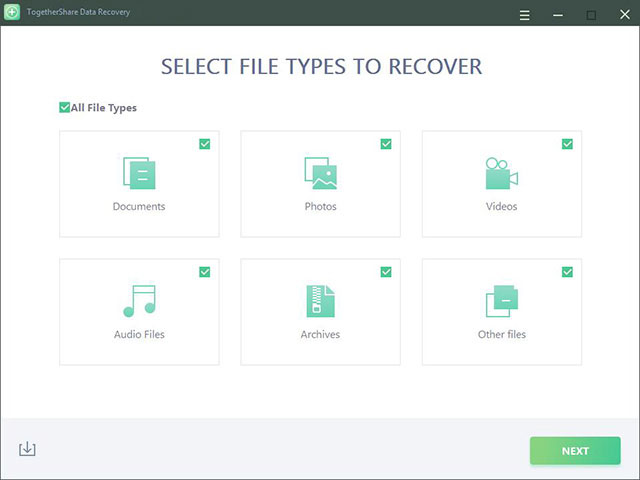
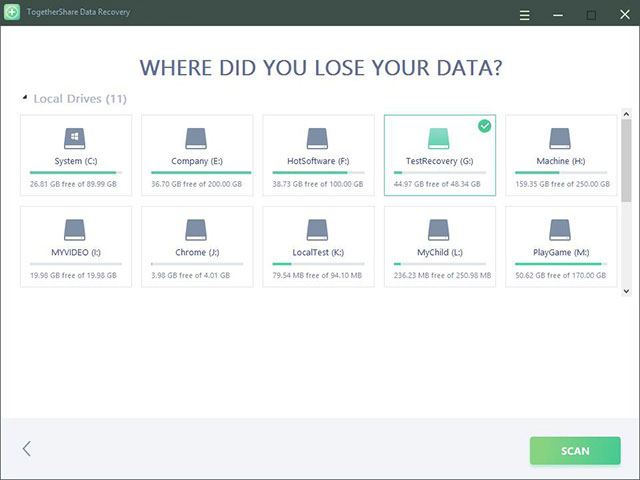
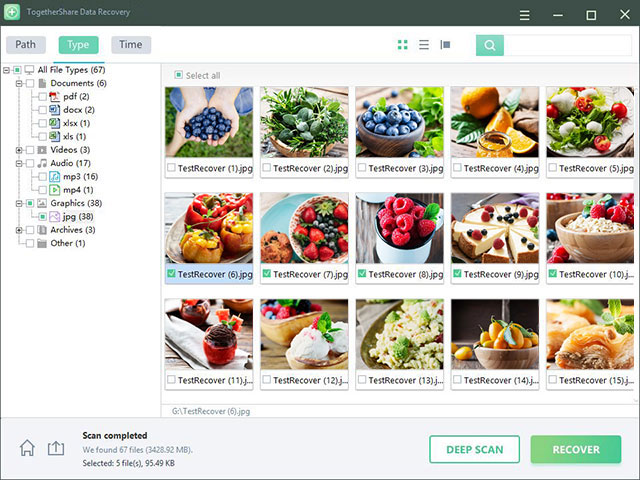
強力なハードドライブのデータ復旧ソフトウェア回復を削除、フォーマットは失われたデータからハードディスクドライブ、メモリーカード、USBメモリは、デジタルカメラやその他の記憶装置です。
- 回復すべてのファイルの種類
- 回復すべてのデバイス
- 簡単かつ効率的な
回復すべての種類のファイルなどの写真、文書、映像、音声、文書、電子メールなどです。
回収データ消失に関してはコンピューター、HDD/SSD、USBドライブカメラのメモリーカード、外付けハードディスクドライブのその他の記憶装置です。
完全に回復すべて失われたファイル内の3ステップ:
-選択ファイルの種類
スキャンは、ハードドライブ/装置
-プレビューおよび回収ファイルです。
The current text is the result of machine translation. You can help us improve it.
必要なシステム:
Windows 2000/ XP/Vista/ 7/ 8/ 8.1/ 10
出版社:
TogetherShare Softwareホームページ:
https://www.togethershare.com/data-recovery-software/pro-data-recovery-software.htmlファイルサイズ:
10.3 MB
価格:
$69.95
GIVEAWAY download basket

Developed by Informer Technologies, Inc.

Developed by IObit

Developed by Garmin Ltd or its subsidiaries

Developed by Disc Soft Ltd.
iPhone 本日のオファー »

$19.95 ➞ 本日 無料提供

$0.99 ➞ 本日 無料提供

Every Day Spirit is a collection of beautiful, original, hand-crafted wallpapers created to make your phone look amazing.
$0.99 ➞ 本日 無料提供

$4.99 ➞ 本日 無料提供

$1.99 ➞ 本日 無料提供
Android 本日のオファー »

$0.99 ➞ 本日 無料提供

$0.99 ➞ 本日 無料提供

Spelling Right is a new challenging educational spelling game that will test your English spelling skills.
$2.29 ➞ 本日 無料提供

$0.99 ➞ 本日 無料提供

$1.49 ➞ 本日 無料提供
コメント TogetherShare Data Recovery Professional 6.6
Please add a comment explaining the reason behind your vote.
quick to download and install, easy to activate with activation key included in read-me file, tried it on a flash drive that I had just reformatted, found all files and even recovered them with the same file name, so far, positive experience
Save | Cancel
Morris, If you overwrite it with data, how can you conceivably restore it? Surely overwriting with data is the one way to make something unrecoverable! Do you expect software to perform miracles like bringing back to life someone who has died and been cremated?
Save | Cancel
TRACY , Formating does not destroys data sectors, try to copy few GB of data on top of it and then try to recover. That is how you will know if this software is good or not.
Save | Cancel
Works ...
Pro's:
1.It's quick - easy to use
2. Finds a number of files
3. Tells you what it's doing
4. Allows you to pick what to recover
5. Accurately recovered those files
6. Offered the option of a deep scan which I assume will take longer - I didn't try this.
Cons:
1. When you click the icon then nothing happens for a few seconds before the programme starts - there needs to be a "loading" screen or something to tell you something is happening.
2. When selecting the directory there's an orange button that might have text on it - but none displays by me - but if you click it - things happen
3. Things are hidden in directory structures that make them very hard to find without spending a lot of time randomly clicking every directory structure to find where the files are you were looking for. There was a lot of empty directories and empty files here and I couldn't work out why they were being displayed - they had no recovered files in them, nor were there ever the type of file I was looking for in them either.
4. In order to recover something I had to select the directory and it would recover the entire directory structure in order to recover the single file - for example I now have a directory structure that says:
=Recovered data at date & time
= C:
== other lost files
=== random numbers
==== 4 empty directories (named as they were before they were deleted)
==== original_name.ogg file (which is what I was attempting to recover - and it plays, fully and correctly recovered.)
Save | Cancel
To recover an overwritten file on Windows PC, open Windows Explorer and navigate to the folder where the file was located in. Right click anywhere inside this folder and select Properties from the context menu. After that, select the Previous Versions tab and look for an earlier version of the overwritten file.
Save | Cancel