日本語
毎日 通常購入しなくては使用できないソフトウエアを無料で提供します!
$19.90
期限切れ
Giveaway of the day — True Launch Bar 5.2
True Launch Bar is a superior replacement for the standard Windows Quick Launch bar and all functions plus more are presented in True Launch Bar.
$19.90
期限切れ
ユーザーの評価:
481
コメントを残す
True Launch Bar 5.2< のgiveaway は 2011年2月10日
本日の Giveaway of the Day

どこからでも、あらゆるデバイスからリモート デスクトップまたはラップトップを制御します。
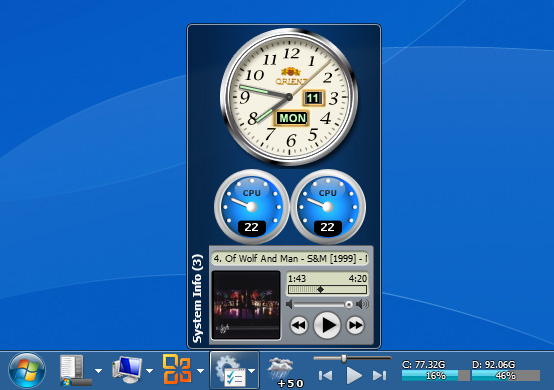
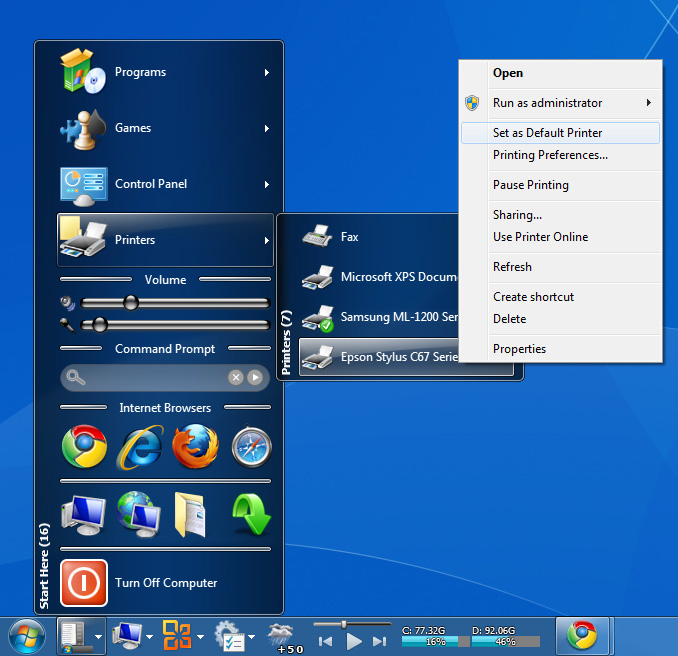
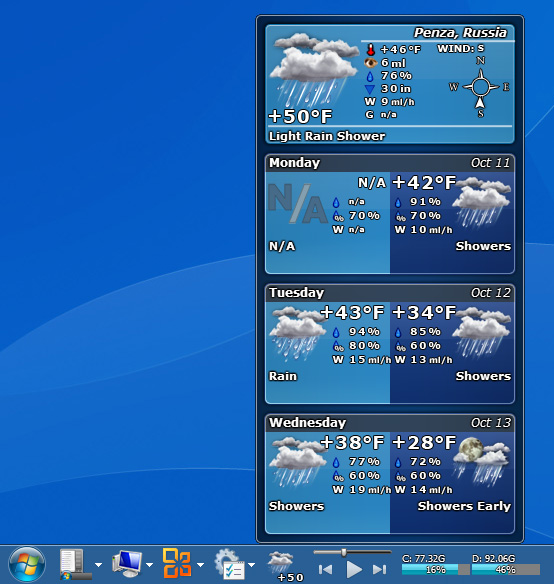
True Launch Bar は標準の Windows Quick Launch バーとその機能が実施し、ショートカットをグループ別に分けたりポップアップのメニュー形式で表示可能。
True Launch Barは引き落とし作業で作成・管理を容易にし、ショートカットの管理をさらに簡単に実施。アプリケーションの稼動もスピードアップ。
小さなアプリケーションが稼動するようにボタンを追加してその稼動を簡素化、重要なメールチェック、天気チェック、最新ニュースチェック、また音楽のボリューム変更などがタスクバーのボタンで簡単に稼動。
True Launch Bar ショートカットはスキン形式で Windows Vista や Windows 7利用者は Aero インターフェースで半透明化のショートカットを作成可能。
必要なシステム:
Windows XP/ Vista/ 7
出版社:
Tordexホームページ:
http://www.truelaunchbar.com/ファイルサイズ:
15.3 MB
価格:
$19.90
GIVEAWAY download basket

Developed by Informer Technologies, Inc.

Developed by IObit

Developed by Garmin Ltd or its subsidiaries

Developed by Disc Soft Ltd.
iPhone 本日のオファー »

$19.95 ➞ 本日 無料提供

$0.99 ➞ 本日 無料提供

Every Day Spirit is a collection of beautiful, original, hand-crafted wallpapers created to make your phone look amazing.
$0.99 ➞ 本日 無料提供

$4.99 ➞ 本日 無料提供

$1.99 ➞ 本日 無料提供
Android 本日のオファー »

$0.99 ➞ 本日 無料提供

$0.99 ➞ 本日 無料提供

Spelling Right is a new challenging educational spelling game that will test your English spelling skills.
$2.29 ➞ 本日 無料提供

$0.99 ➞ 本日 無料提供

$1.49 ➞ 本日 無料提供
コメント True Launch Bar 5.2
Please add a comment explaining the reason behind your vote.
I forgot, you must use Components Manager (found at Start-> True Launch Bar) to install things on it like Plugins, Languages and Media Control.
Maybe the dev should say that at the end of the install
Save | Cancel
I normally wouldn't bother with this type of utility since I don't use them, but this doesn't replace the Start menu (although you can) so I installed it. Uses the Microsoft Installer, which is good, but doesn't create a restore point. However, the install was clean, most plugins are just a DLL. When installing, I checked the option which downloads and installs all plugins (makes them available, but you have to later select which you want to use). Tremendous number of options, flexibility, all sorts of plugins. You absolutely must read the Help, there's an awful lot to this, you can configure things endlessly. I installed this on Win7x64, which normally doesn't have a Quick Launch bar, so this didn't replace anything (of course, had to adjust the taskbar after selecting True Launch Bar). You can backup and restore your configuration, which could be handy when changing the endless configuration options. There's a lot of nonsense in the comments and suggestions, you can already resize the icons, run the Standalone version (not the typical meaning, runs separately from the taskbar), export settings to another computer, configure hotkeys, etc. Read the Help before commenting. For now, I'll leave this installed just to play with some of the large number of plugins. As usual, you should also check the developer's website, there are FAQs, etc. Before installation, you can check out some of the endless features.
FYI, Adobe released Flash Player 10.2. Depending upon your video card and drivers, can perform hardware acceleration. Some performance features require updated software on the servers, which is presently mostly only major sites like YouTube, etc. I've had some problems with it, but I'm sure there will be frequent updates.
Save | Cancel
This puts your quick launch bar on steroids(that launch/tab area between your tray and the start menu button).
If you've ever right clicked that area>>>Toolbars>>> (and you get address, links, tablet pc input panel, etc by default) or made your own 'toolbar', this is a a deluxe version of that which integrates in with the windows operating system. It allows for widget-like things on the toolbar (calculator, address list, volume control, etc.) The calculator had me going, (imagine having the auto-hide toolbar pop up and there be a calculator embedded right on the toolbar). the volume control/mute is nice too for when you need a quick mute. If you are into that, then in my opinion this is pretty cool and you owe it to yourself to download the program.
I really liked this program but decided not to keep it as it wasn't portable. I used to be into tweaking toolbars like this (and for me they take alot of time to get them right). However, for launchers I now use the Rocket Dock and the Pocket Start Menu(both of which are free portables and as portables are safer from system crashes). I use the MoffFreeCalc on the Rocket Dock (a portable free calculator) which is almost as convenient as the embedded calculator here when put on the rocketdock and has the added advantage of having a tape that keeps track of my transactions.
That's part of the problem with basic plug-ins, location may make them more convenient on a toolbar, but they aren't usually as good as your favorites.
All in all this is an excellent (non-portable) toolbar app. But it isn't quite for me as I have portables that perform the same functions for me (even if they don't do the same thing as this program does).
Save | Cancel
Found the "Getting Started with True Launch Bar" video here. I guess this can be useful for some one.
Save | Cancel
This program is a bit confusing, but the results are nice. I was creating folders which contained shortcuts and then was adding the folders to my toolbar. I would click on the folder in the toolbar, and a menu/submenu of shortcuts would appear. This program now improves on my method, and makes the whole thing look prettier. Its about the same in efficiency though. I like how you can add transparency/glass effects on windows 7, even though i turned those effects off in my personalization settings. What I mean is that, my toolbar was kinda bland and colorless because I was using WINDOWS CLASSIC settings. This new program offered here puts a colored glass toolbar over my real toolbar and then lets me edit icons/texts/buttons menus. Its fun and practical. I like it.
Save | Cancel